

A disaster recovery plan is the document nobody wants to write and everybody wishes they had — usually at 2 AM, while production is down and customers are asking questions. The numbers explain why it matters: 22% of organizations still have no formal disaster recovery program, only one in five describes itself as fully prepared for outages, and downtime routinely costs businesses thousands of dollars per minute. Worse, when disaster strikes the unprepared, it is often terminal — the widely cited industry figure is that 93% of companies that suffer a major data loss without a disaster recovery plan are out of business within a year. However, building a workable plan is far less complicated than most vendors make it sound. Here is the practical version.
What a Disaster Recovery Plan Actually Is (and What Counts as a Disaster)
A disaster recovery plan is a documented, tested procedure for restoring your IT systems — servers, data, applications, and access — after a disruptive event. “Disaster” sounds dramatic, but most triggers are mundane: hardware failure causes the majority of downtime, followed by human error, power outages, ransomware, and only rarely the floods and fires people picture.
Consequently, a good plan is not about predicting which disaster will hit. It is about answering four questions before the pressure is on: What must come back first? How fast? From which backup? And who does what? According to Secureframe’s 2026 disaster recovery research, organizations with automated, rehearsed response resolve incidents dramatically faster and cut annual outage costs by 45% — preparation, not luck, is the variable.
The Two Numbers That Define Your Disaster Recovery Plan: RTO and RPO
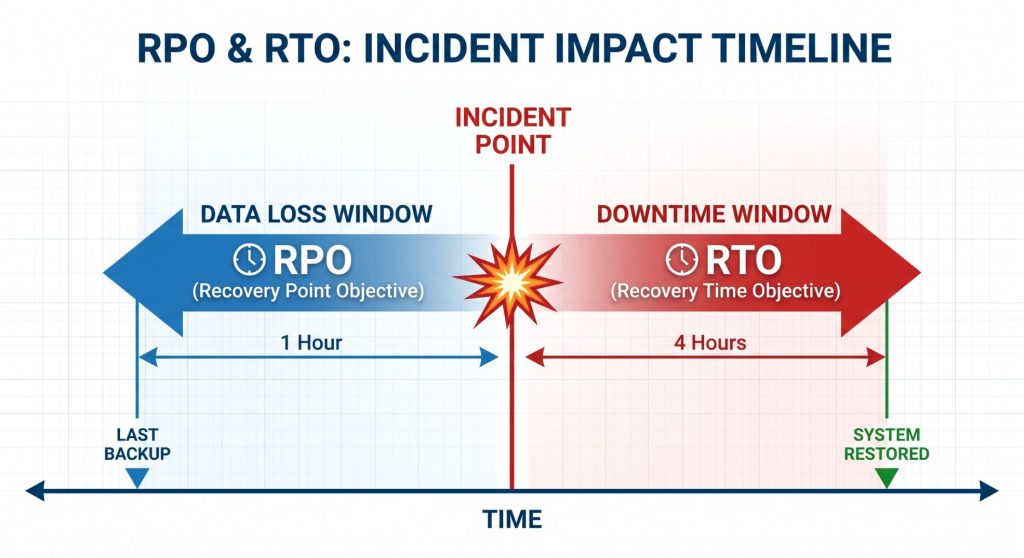
Every disaster recovery plan is built on two targets, and agreeing on them is the single most important planning conversation:
- RTO — Recovery Time Objective: How long can this system be down before the damage is unacceptable? An e-commerce checkout might have an RTO of 15 minutes; an internal reporting tool might tolerate 24 hours.
- RPO — Recovery Point Objective: How much data can you afford to lose? An RPO of one hour means backups (or replication) must capture changes at least hourly. For a transactional database, even five minutes of lost orders may be too many.
Here is the discipline most businesses skip: not every system deserves the same targets. Tier your applications — critical, important, deferrable — and set RTO/RPO per tier. Aggressive targets everywhere make the plan unaffordable; loose targets everywhere make it useless. Industry data shows 37% of organizations miss their RTO simply because backups were missing or untested when the moment came — a failure of process, not technology.
When did you last restore from backup?
We run backup and disaster recovery as a managed service, including quarterly restore drills with a written report.
Backup Strategy: The Engine Inside Every Disaster Recovery Plan
Backups are where disaster recovery plans succeed or die. The proven baseline is the 3-2-1 rule — three copies of your data, on two different media, with one copy off-site — now extended for the ransomware era to 3-2-1-1-0: one additional copy kept offline or immutable, and zero errors verified by automated restore testing.
- Immutable or offline copies are non-negotiable: Modern ransomware hunts and encrypts backup repositories before revealing itself. A backup an attacker can delete is not a backup — it is a hope.
- Snapshots are not backups: Hypervisor snapshots on the same storage die with the storage. Use them for quick rollbacks, never as your recovery foundation.
- Test restores, not backups: A staggering share of DR failures involve backups that “ran successfully” but would not restore. Schedule automated restore tests — monthly for critical systems — and treat a failed restore as a production incident.
- Back up configurations too: Server configs, DNS zones, firewall rules, and SSL certificates. Rebuilding data onto a server nobody can reconfigure is still downtime.
Tooling matters less than discipline, but it matters: enterprise platforms like Acronis provide immutable storage, bare-metal restore, and replication — capabilities our team deploys daily as part of server management and virtual server management for clients running everything from single cPanel servers to full VMware clusters.
Cloud Disaster Recovery: Why Your Disaster Recovery Plan Should Use the Cloud
The most significant shift in disaster recovery is that a warm standby no longer requires a second data center. Cloud disaster recovery — replicating your critical workloads to AWS, Azure, or a private cloud — has made enterprise-grade resilience affordable for ordinary businesses, and industry data indicates cloud-based DR can cut recovery times by up to half compared to traditional approaches.
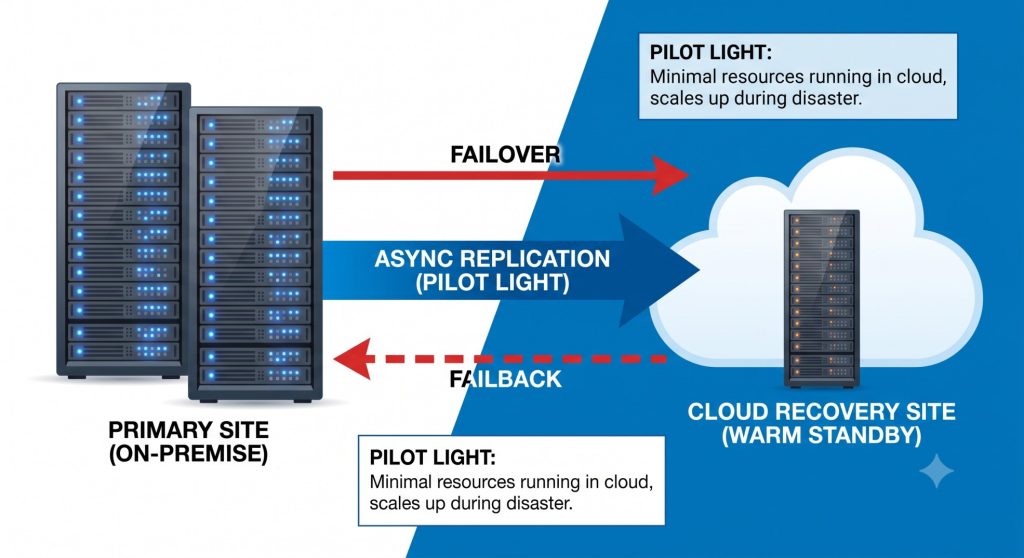
The practical patterns, from cheapest to fastest: backup-and-restore to cloud storage (lowest cost, slowest recovery), pilot light (core systems replicated but dormant), warm standby (scaled-down copy running continuously), and active-active (full redundancy, near-zero RTO). Most businesses land on pilot light or warm standby for their critical tier — real protection at a fraction of a second site’s cost. Additionally, DR costs are cloud costs: idle replicas and over-provisioned standby environments deserve the same scrutiny we described in our cloud cost optimization guide.
Platform choice affects the details — Azure Site Recovery versus AWS Elastic Disaster Recovery, region pairing, and egress costs all differ — and our AWS and Azure teams design DR architectures on both. If you are still deciding between platforms, our Azure vs AWS comparison covers the trade-offs.
Testing and Ownership: The Part of the Disaster Recovery Plan Everyone Skips
An untested disaster recovery plan is a theory. The data is unforgiving: 65% of companies fail their first DR test, roughly a third of organizations never test their backups at all, and half of those that do test do so once a year or less. Every one of those gaps is discovered eventually — either in a drill or in a disaster.
The fix is cadence and ownership. Test quarterly for critical systems and after every major infrastructure change. Run tabletop walkthroughs (an hour in a meeting room) between full failover drills. Assign a named owner for the plan, keep printed and offline copies — a plan stored only on the server that just died is a punchline — and document the first hour precisely: who declares the disaster, who communicates with customers, who starts the restore. Prevention still matters, of course: a hardened server fails less often in the first place, which is exactly what our companion guide to Linux server hardening covers. But hardening reduces probability; disaster recovery caps the damage. You need both.
At VIPoint Solutions, we build, run, and — critically — test disaster recovery for businesses worldwide: tiered backup architectures, cloud replication, documented runbooks, and scheduled restore drills, all monitored 24/7 by our helpdesk support team. When something breaks at 2 AM, our engineers are already awake in your timezone’s night — that is the practical advantage of an India-based NOC.
Related service: our backup and disaster recovery service puts everything in this guide into practice: 3-2-1 backups with an immutable offsite copy, agreed RPO and RTO, documented runbooks, scheduled restore drills and a 24/7 team to run the recovery.
Get a free security audit of your server
Our Linux engineers will review one server or website from the outside and send you a prioritised fix list within 2 business days. No agents, no access, no obligation.
Would your business survive a full server loss tomorrow? Contact VIPoint Solutions for a free disaster recovery readiness review. We will map your current RTO/RPO reality against your business needs and give you a gap report with a prioritized fix plan.